Document Type
Condition Report
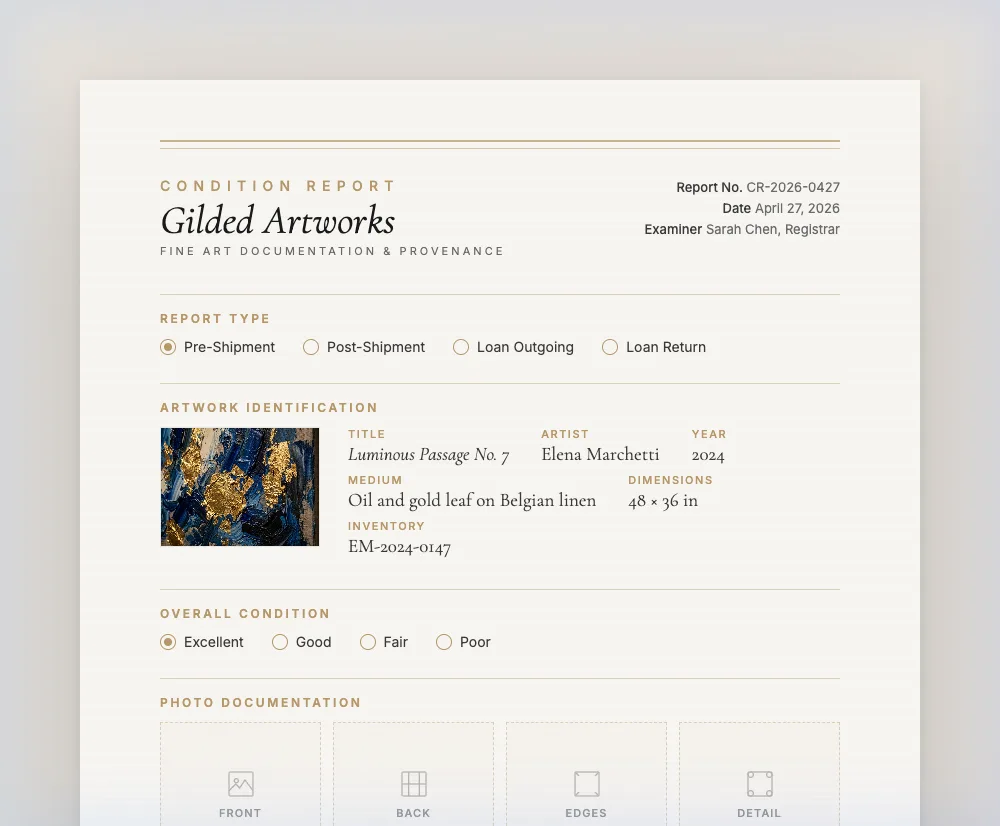
A condition report decides insurance claims, and the pair of reports either side of a journey decides them faster than any argument. Gilded Art Works prints the form: the work itself with its image and details, a report-type selection covering pre- and post-shipment and loan outgoing and return, an overall condition grade, a ten-point assessment across surface, support, frame and hardware, and a panel for the examiner’s written notes over two signature lines.
Best for: Registrars, galleries shipping sold works, lenders and borrowers on exhibition loans, and anyone who has lost an insurance argument for want of a baseline.

What’s in the document
- The work printed with its image, title, artist, year, medium and dimensions
- Report type: pre-shipment, post-shipment, loan outgoing, loan return
- Overall condition grade: excellent, good, fair, poor
- Ten-point assessment covering surface, support, frame, hardware and damage categories
- Examiner notes panel for written findings
- Signature lines for the examining registrar and a gallery countersignature
- One block per work when several are examined together
Why the pair matters more than the report
A single condition report is an opinion about how a work looked on one day. A pair — one made before the crate closed, one made when it opened — is evidence of change. Insurers settle on the difference between the two, and the absence of the first is the most common reason a transit claim stalls: with no documented baseline, nothing distinguishes damage caused in transit from damage that was already there.
The same logic governs loans. A registrar releasing a work to an institution and receiving it back three months later has two moments at which the work is in front of them and available to be recorded, and no other moments at all. Museum loan agreements — including the loan agreement generated here — require a condition report signed by both parties on despatch and again on return for exactly this reason.
The ten points, and what each one is looking at
The assessment grid is fixed at ten lines. They are the categories a conservator would work through on a painting, in roughly the order the eye moves.
- Paint surface, cracking or flaking, discoloration
- The three lines covering the paint layer itself — its integrity, whether it is lifting or losing adhesion, and whether the colour or varnish has shifted. Craquelure that is stable is not damage; craquelure that is cupping is.
- Canvas or support, stretcher bars
- The structure carrying the image. Slackness, planar distortion, corner draws, keying and any repair to the stretcher belong here — a support problem becomes a paint problem if it is left.
- Frame, mounting hardware, glazing or varnish
- The parts most often damaged in handling and most often overlooked in reporting, because they are not "the art". A chipped frame corner and a bent D-ring are both claimable and both cost money to put right.
- Scratches or abrasions, water damage
- The two categories that most often appear between a despatch report and a return report, and the two that a photograph taken at the time is worth more than a paragraph about.
How to use the printed form honestly
The form prints with Excellent indicated on each of the ten lines and on the overall grade. That is a starting state, not a finding. The examining registrar is expected to mark down any line that differs and to write the detail into the examiner notes panel — and a report that comes back with every line untouched should be treated as a report nobody actually made.
Two habits make the difference between a report that settles a claim and one that invites an argument. Write in the notes panel in specifics — where on the work, how large, what it looks like — rather than in adjectives. And photograph what you describe, separately, at the time, keyed to the note. The form does not print photo zones; the photographs live alongside it in your file, named against the document number in the footer.
What it does not do
It does not assess anything. Every mark on the page is made by a person, and the platform has no view on the state of your work. It does not print photo-mounting zones, and it does not attach or store images beyond the artwork photograph on the record. It does not compare two reports for you or flag differences between a despatch and a return. And it is not a conservator’s examination: the ten points are a registrar’s handling check, and where they raise a question, the answer comes from a conservator and belongs in a conservation report.
Questions, answered
What does the ten-point assessment cover?
Paint surface, canvas or support, frame, mounting hardware, glazing or varnish, stretcher bars, scratches and abrasions, discoloration, cracking and flaking, and water damage. Above them sit a report-type selection and an overall grade of excellent, good, fair or poor.
Why does the form print with Excellent already marked?
It is the default state of a printed form, not a finding. The examining registrar marks down any line that differs and writes the detail into the examiner notes panel. Treat an untouched report as one that was never actually made.
Can I attach photographs to the report?
Not within the document — it prints no photo-mounting zones, and the only image on it is the artwork photograph from your record. Photograph findings separately at the time of examination and file them against the document number in the footer.
Why generate reports both before and after shipment?
The pre-shipment report establishes the baseline; the post-shipment report documents change against it. Insurers settle on the difference. One without the other is an opinion rather than evidence, which is why loan agreements require both.
Can one report cover several works?
Yes. Each work you add prints its own block with its own image, report-type selection, overall grade and ten-point grid, under one document number and one pair of signatures.
Also in the library
Your first condition report is free.
One artwork entry, any of the 15 document types. Three a month on the free plan, no card required.
Create Your First Document — Free